 GIFDesk
GIF to Sticker: Keep the Reaction, Lose the Wait
The eye roll takes one second. The GIF takes eight. There is a pause before it, another pause afterward, and a camera move nobody needs in a chat reaction.
For GIF-to-sticker conversion, start by keeping the part that communicates the reaction. Then fit it onto a square canvas and check the exported bytes and duration. For Discord, that means 320 × 320 pixels, no more than 512 KiB, and an animation no longer than five seconds.
A tighter clip often makes a better sticker, but leave enough lead-in for the expression to make sense. An eye roll that starts halfway through can look like an accidental blink.
This workflow creates a Discord GIF sticker. Other platforms have different formats and import steps. Renaming a GIF does not turn it into a WhatsApp or Telegram sticker.
Make sure you actually have a GIF
Some reaction sites offer a video download even when the page calls it a GIF. Check the file you saved. GIFDesk's sticker converter accepts GIF animations and static PNG, JPEG or WebP images; it does not accept an MP4 directly.
If you have a short video, use video-to-GIF conversion first. That local video conversion does not require the AI generation service. Preview the resulting GIF before starting another export, especially if the source had text or quick movement.
You can also use the GIF maker from images to assemble your own animation. Give each frame enough time to read. A slideshow of unrelated images usually needs more context than a single reaction, which can make the sticker feel slow.
Find the first useful frame
Upload the GIF and inspect its frame strip. Set the first frame just before the action begins, then choose the last frame after the expression becomes clear. Play that selection in the exported result.
Frame numbers are useful handles, but frame counts alone do not tell you the duration. One frame may hold much longer than another. Read the output duration instead of assuming that twenty frames must be short enough.
The GIF trimmer is helpful if you want to prepare several versions of a longer source. Save the original as well. After a few experiments, it becomes surprisingly easy to forget which copy still contains the complete reaction.
Give the movement enough room
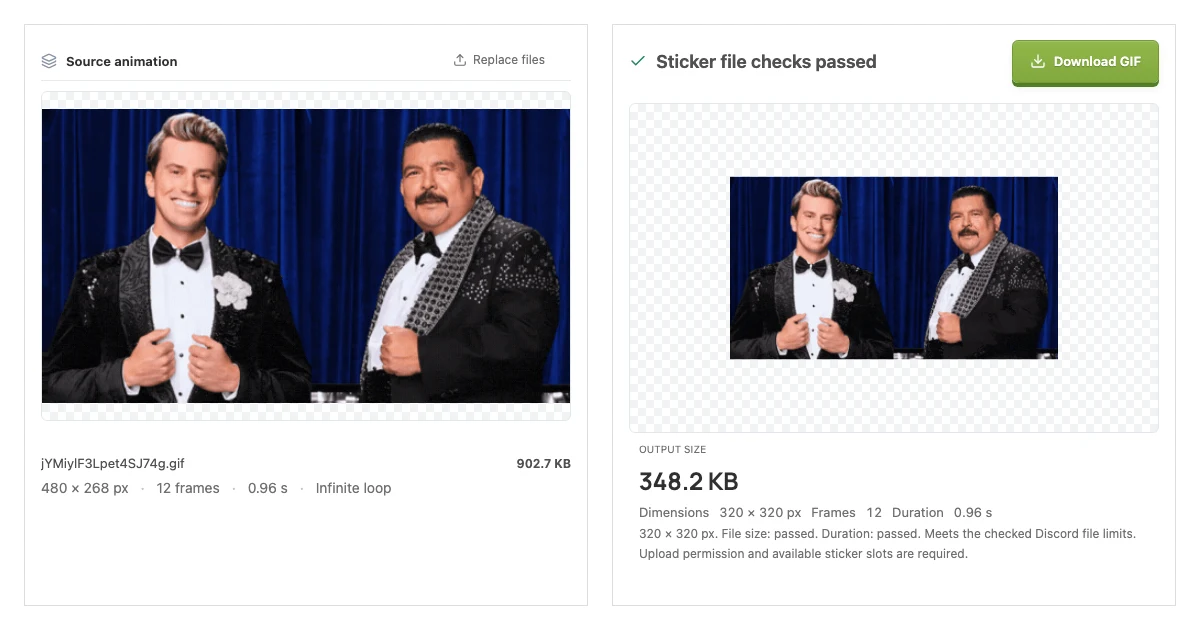
Try the GIF-to-Discord-sticker converter.
Choose fit if the character moves toward the edges. Transparent padding preserves the whole source frame without stretching it. Choose fill when you want a closer square view and can afford to lose the outer edges.
Watch a complete cycle. Hands, hats and subtitles can enter the frame later, so a crop chosen from the opening image may remove the detail that makes the reaction recognizable. A slightly smaller person with the full gesture can work better than a large face with the punchline cropped off.
Reduce the file without changing the joke
An animated sticker maker can reduce colors and retained frames, but those choices have different effects. Fewer colors may roughen shaded areas. Fewer frames may turn smooth movement into jumps.
GIFDesk combines skipped frame delays with retained frames when you use frame reduction. This preserves the selected duration rather than speeding the whole clip up. If the animation is over five seconds, shorten the range; keeping fewer frames alone will not fix that limit.
Export one version before changing several settings. If the gesture is still readable and the file checks pass, you may already have what you need. There is no prize for squeezing out another kilobyte after the expression starts looking worse.
Download the checked output
Discord's official sticker documentation, re-checked on October 12, 2026, accepts GIF as an upload format. You do not have to convert every Discord animation to APNG. GIFDesk exports GIF when more than one frame remains. A selection reduced to a single frame exports static PNG. APNG conversion is not supported.
Check the saved file's dimensions, size and duration in the result panel. The tool keeps the square canvas fixed and explicitly marks outputs that exceed the checked limits. Server permissions and available sticker slots still matter, and a real Discord upload has not been verified for these examples.
Keep a version where the reaction remains easy to read. If the only compatible export loses the important moment, try a simpler source instead of spending the afternoon compressing a joke out of existence.