 GIFDesk
MP4 to GIF: A Real Conversion Case Study with GIFDesk
GIFDesk can turn a short MP4 into a silent, looping GIF in your browser. In this October 12, 2026 case, the live tool converted a user-supplied reaction video successfully. After cropping a lower-left text mark from the video, we repeated the conversion and downloaded a 320 × 217 GIF of 368,328 bytes.
This case study uses a real source MP4 and the actual GIF downloaded from GIFDesk. It documents the conversion settings, framing change and measured output size.
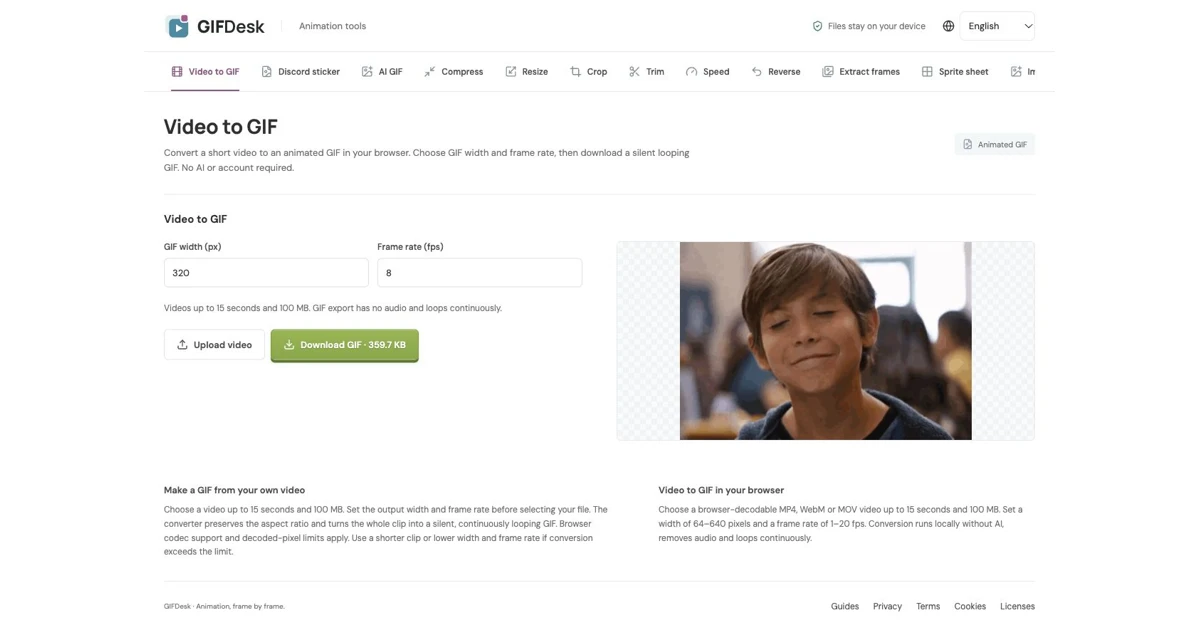
Screenshot source: GIFDesk's live video-to-GIF page, captured October 12, 2026 after processing the user-supplied video. The footage was supplied by the site owner for this case; GIFDesk does not claim ownership of the underlying footage.
Watch the actual source and exported GIF
These are the actual files used in this case. Play the original to see the lower-left mark, then compare it with the GIFDesk export. The GIF below plays continuously; it is the downloaded output, not a reconstructed preview.

Convert the MP4 in GIFDesk
Open Video to GIF. Choose the output width and frame rate before selecting the file. We used the defaults, 320 pixels and 8 fps, then selected GOBOYS (7)_H.264.mp4 and waited for the download link.
The source was an 848 × 636 H.264 video, approximately 1.502 seconds long, with 36 frames and no audio. The live tool produced a 320 × 240 GIF of 402,797 bytes. The successful download established that GIFDesk could decode and convert this exact source.
This workflow runs locally in the browser. It does not use the AI image or video generation API. The tool accepts browser-decodable short videos; a different codec or a longer clip may need preparation before conversion. Its current interface specifies videos up to 15 seconds and 100 MB, with width settings from 64 to 640 pixels and frame rates from 1 to 20 fps.
Download the result and preview it. Check the expression, the framing and the restart between the last and first frames. Infinite looping does not make a clip's endpoints visually seamless. Higher frame rates can retain more motion, but can also increase GIF size.
Crop a corner logo without inventing the background
The sample had a lower-left text mark in the bottom strip. We removed the bottom 60 pixels from the MP4, changing its canvas from 848 × 636 to 848 × 576. This removed the mark by changing the framing; it did not reconstruct the pixels behind the text.
We performed this edit locally with FFmpeg, outside GIFDesk. GIFDesk's video-to-GIF page does not provide a video logo-removal control. The exact command for this source was:
ffmpeg -i input.mp4 -vf 'crop=848:576:0:0' \
  -an -c:v libx264 -crf 18 logo-free.mp4
Keep the original and save the crop separately. These dimensions are specific to this example. For another clip, inspect the whole animation before choosing a crop, especially if hands, captions or other important details enter the bottom of the frame. Removing a visible mark does not change the footage's ownership or grant redistribution rights.
Convert the edited source again
We uploaded the cropped MP4 to the same live GIFDesk page and kept the default 320-pixel width and 8 fps. The second conversion succeeded and produced a 320 × 217 GIF of 368,328 bytes. The exported dimensions reflect the cropped video's aspect ratio.
| File | Dimensions | Size |
|---|---|---|
| Original MP4 | 848 × 636 | 181,073 bytes |
| First GIFDesk GIF | 320 × 240 | 402,797 bytes |
| Cropped MP4 | 848 × 576 | 226,624 bytes |
| Second GIFDesk GIF | 320 × 217 | 368,328 bytes |
The GIF was larger than the source MP4 in this case. Converting to GIF does not guarantee a smaller file. The cropped MP4 also increased in size because it was re-encoded with the selected quality settings. Use the measured output rather than assuming that fewer pixels always mean fewer bytes.
What the case shows
The case documents two conversions on the live GIFDesk website, actual downloaded GIF files and a separately cropped MP4. The lower-left mark was removed by discarding the same bottom strip throughout the clip. It does not establish seamless looping or permission to publicly redistribute the source footage.
The source, edit and export metadata were saved with this case. The example GIF is an actual download from the live tool; the original video, cropped MP4 and GIF sizes were inspected independently. The GIFDesk editorial team prepared this article with drafting assistance and reviewed its claims against the actual files.