 GIFDesk
Ezgif vs GIFDesk: What Happened When We Resized the Same GIF
A GIF can hit the right dimensions and still miss the brief. It might be too large for an upload limit, lose its timing, or leave an ugly rectangle where transparency used to be. A preview alone doesn't answer all of those questions.
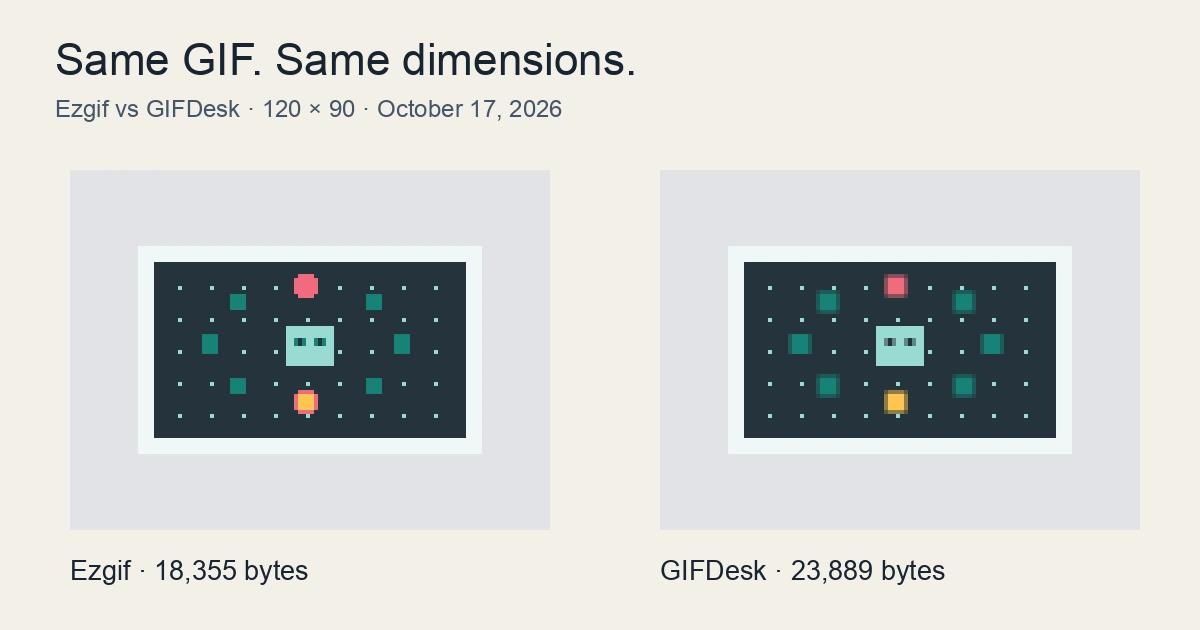
We gave Ezgif and GIFDesk one small job: resize the exact same animated GIF from 240 × 180 to 120 × 90 pixels. Ezgif produced the smaller download in this run. Both outputs retained the frame count, frame delays, and infinite-loop setting.
Disclosure: We're the GIFDesk team. This is a narrow, brand-authored comparison, not an independent review. Browser actions were performed with an AI assistant; downloaded files were inspected locally with Pillow. We haven't timed the tools or run a broad quality benchmark.
Key takeaways
- Ezgif's output was 18,355 bytes; GIFDesk's was 23,889 bytes.
- Both files were 120 × 90, with 32 frames lasting 80 milliseconds each.
- This compares the settings we used on one synthetic animation. It doesn't establish an overall winner.
What we actually tested
Our input was orbit.gif, an animation generated for GIFDesk's own sample library. It contains simple moving shapes on a transparent background, not camera footage or a customer's artwork. That provenance matters: a small, clean animation is a poor stand-in for a noisy video clip.
The source was 45,261 bytes, with 32 frames and a total encoded duration of 2.56 seconds. We used that same file in both live websites on October 17, 2026, in Chrome Incognito.
In GIFDesk's GIF resizer, we set width to 120 pixels, kept the aspect-ratio option enabled, and left the palette at the default 128 colors · balanced. The height became 90 pixels. We applied the change and downloaded the GIF.
In Ezgif's resizer, we uploaded the original, entered width 120, and left height empty for automatic sizing. We retained the default Gifsicle resize method. Local processing was unchecked, so this was the upload workflow. We didn't run a separate optimizer afterward in either tool.
These are comparable tasks, but they aren't identical encoding configurations. GIFDesk's palette setting and Ezgif's Gifsicle method are different controls. Treat the result as a comparison of these two workflows, not a controlled encoder experiment.
The downloaded files told a clearer story
| Check | Source | Ezgif | GIFDesk |
|---|---|---|---|
| File size, bytes | 45,261 | 18,355 | 23,889 |
| Dimensions | 240 × 180 | 120 × 90 | 120 × 90 |
| Frame count | 32 | 32 | 32 |
| Delay of every frame | 80 ms | 80 ms | 80 ms |
| Total encoded duration | 2,560 ms | 2,560 ms | 2,560 ms |
| Loop setting | Infinite | Infinite | Infinite |
| Transparent pixels present | Yes | Yes | Yes |
Ezgif's download was 5,534 bytes smaller than GIFDesk's. If the only requirement had been a 20,000-byte ceiling at these dimensions, Ezgif's file would have passed and GIFDesk's wouldn't. That is a useful result even when you're the team behind the larger output.
The timing checks also matter. We decoded every frame, rather than reading only the page's rounded duration. Both files contained the same sequence of 32 delays at 80 ms. This verifies encoded timing, not identical playback behavior in every browser.
Transparency survived in a limited, measurable sense: every decoded frame contained both transparent and opaque pixels. That doesn't prove that every edge or transparent region matched the source perfectly.


Actual downloaded animations shown at their native 120 × 90 resolution. The cover compares frame 9 enlarged equally.
The decoded frames also show visible differences in shape edges between the outputs. Equal dimensions and timing do not mean identical pixels. We have not scored those differences against a reference, so the smaller file is not evidence of equal or better visual quality.
How we'd choose for the next GIF
For this sample and these settings, choose Ezgif if the smaller download is the deciding requirement. Its default Gifsicle route gave the smaller result without an additional optimization step.
GIFDesk's resize page describes its processing as local to the browser. Ezgif also offered a Local processing checkbox, which we did not test. We haven't audited network traffic or compared those two local-processing paths, so this run cannot settle a privacy comparison.
For your own file, start with the required pixel dimensions. Download from each tool, then check bytes, timing, looping, and the appearance on the background where it will actually be used. If an output exceeds the upload limit, change one setting at a time and keep the earlier version for comparison.
One synthetic GIF is enough to demonstrate that workflow. It isn't enough to rank either product for video-derived GIFs, gradients, tiny text, large animations, processing speed, or overall image quality. Our next useful test would use a different kind of source—not repeat the same easy sample until our own tool wins.